Here's a situation most mobile teams have been in. The checkout flow is green and has been for months. Then a build ships where Add to cart does nothing at all, and the test is still green. Nobody did anything wrong. The test tapped the button and then looked at a screen that happens to look the same either way.
A passing test tells you the steps ran. It doesn't tell you they checked anything. This post is about a way to measure that difference: mutation testing, adapted to UI flows.
First: what's mutation testing?
The idea is older than most of us and fits in one sentence: to find out whether your tests are any good, break the code on purpose and see whether they notice.
In the classic version, a tool makes a tiny change to your source code, called a mutant. Then it runs your test suite against it. Say you have this:
fun canBuyAlcohol(age: Int) = age >= 18The tool flips >= to > and runs the tests. If a test fails, great: the mutant is killed, and your tests guard that line. If every test still passes, the mutant survived. Nobody tested the case where age is exactly 18, and a real bug in that spot would sail through too.
Do that for hundreds of small changes and you get a mutation score: the share of mutants your tests killed. It answers a question that code coverage can't. Coverage tells you which lines ran during the tests. Mutation testing tells you which lines the tests would actually defend.
Coverage asks "did we visit it?". Mutation testing asks "would we notice if it broke?"
Why it never really reached UI tests
Mutation testing is well known for unit tests and almost unknown for UI tests. There's a practical reason. Every mutant is a code change, so every mutant means a new build. For unit tests that's survivable, because the tests run in milliseconds. For a mobile UI flow, each mutant would mean compiling the app, installing it on a device and running a flow that takes a minute. Multiply that by a few hundred mutants and you're measuring in days.
There's a second problem. Most code mutants don't mean anything to a UI test. Flipping a >= in some caching layer says nothing about whether your login flow checks the right things.
So for UI tests we flip it around. Don't mutate the code. Mutate what the user sees.
Breaking the screen, not the source
A UI flow interacts with elements: it taps buttons, types into fields and looks for text. So the useful question for each element is "if this broke the way UI things break in real life, would the flow fail?" Dev Scenario tries these breaks:
| Break | What happens in the app | The real bug it stands in for |
|---|---|---|
| Hidden | The element keeps its space but isn't drawn and can't be found | A view gone after a layout change or a bad feature flag |
| Dead tap | Taps land, nothing happens | A click handler that got unwired in a refactor |
| Disabled | The element reports itself as disabled | A button stuck disabled by broken form validation |
| Text changed | One app string shows a slightly different value | A wrong price, a broken translation, a lost format argument |
Then it runs your flow once per break, each time from a fresh app launch. If the flow fails, the break was caught. If the flow still passes, it survived. That's a blind spot: a real bug of that shape would ship with a green test.
What it finds, in flows like these
Here's where it gets concrete. These are four typical gaps. Each one is a flow that looks perfectly reasonable in review and passes every day.
The cart that's always "fine"
tap("Add to cart")
tap("Cart")
assertVisible("Your cart")
The cart screen says "Your cart" whether it holds one item or none. Make Add to cart a dead tap and this flow still passes.
Dead tap · survivedSuggested fix: after the tap, check what the tap was supposed to change, e.g. assertVisible("1 item").
The price nobody reads
tap("Checkout")
waitFor("Order summary")
tap("Pay")
The summary screen shows Total: $21.99. If a bug turned that into $31.99, the flow wouldn't care: it only waited for the heading. The check lists the total as a text no step reads.
Exactly the kind of thing a formatting or localization regression does to real users. Fix: assertVisible("Total: $21.99"), and from then on a changed price is caught.
The error message that never shows
type("wrong-password")
tap("Sign in")
assertVisible("Sign in")
"We're still on the login screen, so login was refused." But no step reads the error message. If it stopped showing, a user would get no feedback at all, and the test would still be happy. The check lists "Wrong password" as a text no step reads.
Unchecked textFix: assertVisible("Wrong password"). Now the message is checked, and hiding it fails the flow.
The toggle that's just tapped
tap("Remember me")
tap("Sign in")
assertVisible("Welcome back")
The flow taps the toggle and never looks at it again. Make it a dead tap and the flow passes.
Dead tap · survivedFix: check the toggle's state, or relaunch and check that the email is remembered.
None of these flows is "wrong". They're the flows real people write on a deadline. That's the point: nobody can spot these gaps by reading the flow, but a check points straight at them.
Now multiply it by 800 flows
Finding one gap in one flow is nice. The real problem shows up in big projects.
Picture a mature app with hundreds of UI flows. They were written by a dozen people over a few years, against screens that have since been redesigned twice. Every flow is green. Now someone asks a simple question: "If the payment button broke tomorrow, would our tests catch it?"
Nobody can honestly answer that. To find out by hand, you'd have to open every flow, work out what each step really checks, and imagine every way each screen could break. Then you'd have to do it all again after the next redesign, because a check that meant something last year might now just tap through a screen that changed underneath it. On a large suite, that review never happens. So the suite slowly fills with flows that run everything and check very little, and the green dashboard keeps everyone feeling safe.
This is where UI mutation testing earns its keep: it does that review for you, automatically. It doesn't read the flows and guess. It breaks the app and watches what each flow actually does. Point it at a whole project and every flow gets a strength score and a list of exactly which breaks it missed:
devscenario run e2e/ --mutateOn a suite that size it's a nightly or weekly job, not something you run on every commit. Every break is a full run, so it takes a while, but it's machine time instead of weeks of someone reading flows.
- You see where the weak flows are. Start fixing from the lowest scores, instead of guessing which of 800 flows to look at first.
- It stays visible over time. In the Dev Scenario app, each check is kept in the flow's strength history, so when a redesign quietly turns a real check into a tap-through, the chart drops and you see it.
- New flows can't lower the bar. A minimum score on CI (more on that below) stops a flow that only clicks through screens from being merged as "covered".
What it looks like in Dev Scenario
Open a flow, open the Run button's dropdown and pick Run Mutation. You choose the device, the kinds of break, and a budget, because each break is a full run of the flow.
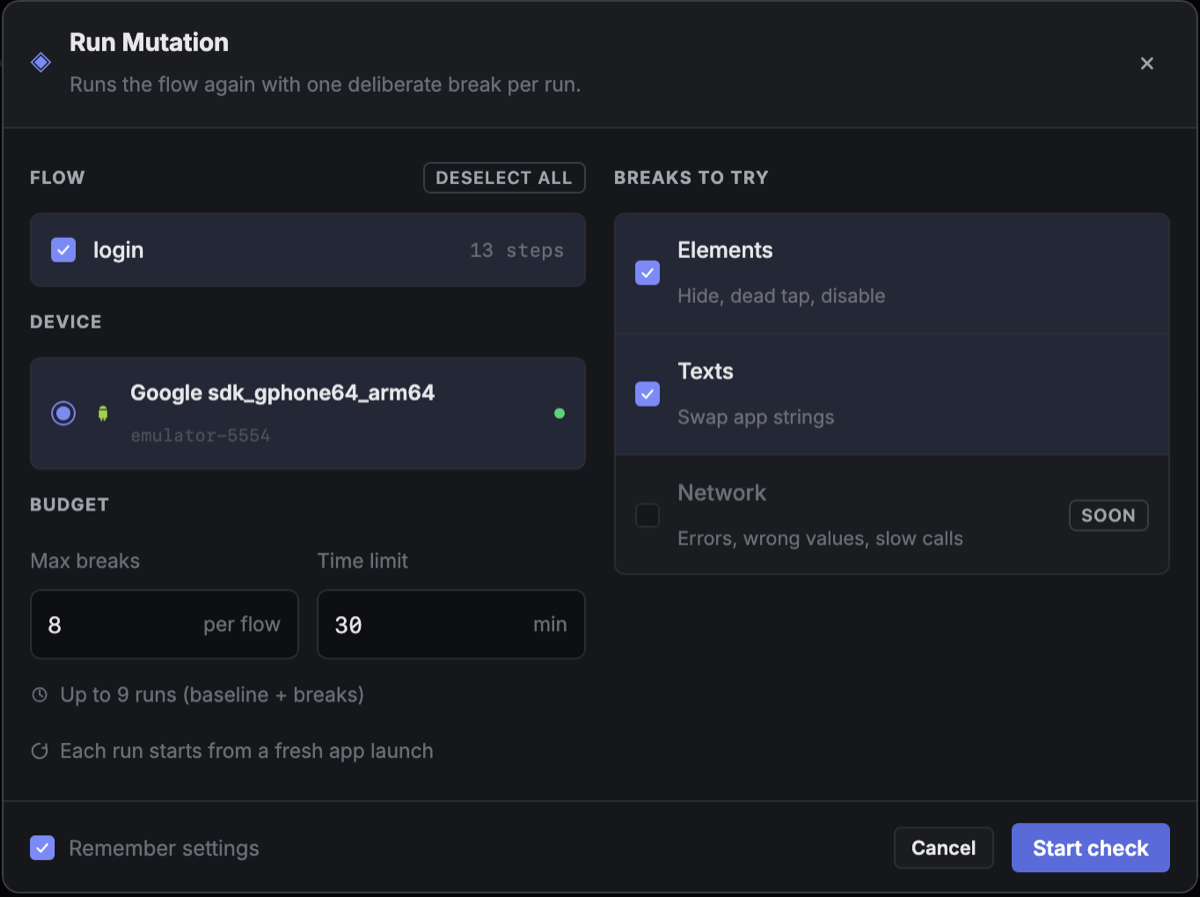
When the check finishes you get the flow's strength and every survivor, each with the step that would have caught it:
A few things make the result useful instead of just a number:
- Report. Every break is drawn as a box on the real screenshot from the baseline run, coloured by outcome, so you see where your flow is blind, not just how much.
- Apply fix. The suggested step goes straight into the flow file, in the right place. Run the check again and watch the survivor turn into a catch.
- Unchecked texts. Texts on screens your flow works with that no step ever reads are listed, for information. They don't count against the score.
- Inconclusive is honest. If the flow failed before the break could matter, say from a flaky wait, that break proves nothing. It runs once more, then counts as neither caught nor survived.
- Ignore list. A clock, an ad slot or a "last synced" label isn't worth asserting. Ignore it once for the whole project and it's never broken or scored again.
- Whole scenarios. A check can cover a scenario of several flows, so a break that a later flow catches still counts as caught.
How it works under the hood
The short version: a small debug-only library in your app applies the break, and the break travels as a launch argument.
Each break is a few bytes of JSON, base64-encoded and passed to the app when it launches:
{"v":1,"id":"m-07","op":"deadClick","target":{"tag":"add-to-cart"}}Elements are found by the test tag you already use for your flows. Texts are found by their string key.
- Android (Jetpack Compose). A Gradle plugin, on debuggable variants only, rewrites your
Modifier.testTag(…)calls at the bytecode level into a version that can carry a break. Your source doesn't change. Text breaks wrap the app'sResources, sostringResource, format arguments and plurals are all covered. During the first, unchanged run the library notes which strings the app loads, so the check knows which string a text on screen came from. - iOS (SwiftUI). A Swift package: you write
.dsTag("add-to-cart")where you'd write.accessibilityIdentifier. Text breaks hook the bundle's localized-string lookup, which coversNSLocalizedString,String(localized:)andText("…"). - Scopes.
dsIgnoreMutations()on a container keeps everything inside it out of the check: third-party views, a debug overlay, anything you don't care about. Dialogs, popups and sheets start their own tree, so they need the scope on their own content too.
On the desktop side, a planner turns the baseline recording into a list of breaks. Each break is aimed at the first step that uses its element. A validator then decides what each run's failure means: a failure at or after that step is a catch, and an earlier one is inconclusive. For a hidden element, the first step that checks text drawn inside it also counts.
What it costs you
This is the part we're happiest with, because it's what kept mutation testing away from UI tests in the first place:
#if DEBUG, and a Release build contains none of the library's code.The one real cost is time. Every break is a full run of the flow, so a check with 20 breaks takes about 21 runs. That's why each check has a break limit and a time limit, and why it's best run on a schedule or on CI rather than on every commit:
devscenario run e2e/checkout.ds --mutate --mutate-max 20 --mutate-budget 30m --mutate-min-score 80--mutate-min-score fails the job when the flow's strength drops below 80%. That way a new flow that only taps through the screens can't quietly lower the bar.
What it doesn't do (yet)
- The in-app libraries aren't published yet. The Android and iOS libraries that apply the breaks aren't on Maven Central or a public Swift package yet, so you can't add them to your own app today. We'll update this post with setup steps when they are.
- Network breaks are coming: error responses, wrong values and slow calls, for flows that need to handle a bad backend.
- Web content is skipped. Elements inside a web view aren't broken, because the browser engine draws them, not your app.
- Strength isn't correctness. A strong flow notices when what it uses breaks. It can't notice a feature it never visits. That's a coverage question, and it's where we're heading next.
What's next: coverage that means something
Here's a question every team with a big UI suite eventually asks: "How much of the app do our tests actually cover?" The usual answer is code coverage: build an instrumented version of the app, run the tests, and count which lines of code ran. It's useful, but for UI tests it has three problems:
- It counts lines that ran, not things that were checked. A flow that taps through ten screens without a single assertion can light up most of your UI code. The number goes up and nothing is tested.
- It speaks in code, not in screens. "68% of
CheckoutViewModel" doesn't tell a QA engineer which button on the checkout screen nobody tests. - It needs a special build. Coverage builds are instrumented, slower and separate from the build you normally test.
A strength check already records every screen a flow passes through, with every button, field and text on it, and what each step did there. Put those recordings together across all your flows and you get coverage measured in the units people actually think in, screens and the things on them, at three levels:
| Level | The question it answers |
|---|---|
| Screens | Which screens do our flows ever reach? |
| Touched | On those screens, which buttons and fields does any flow use, and which texts does any step read? |
| Verified | Of the things the flows touch, which would they notice breaking? That's the strength check's caught vs. survived. |
The last level is the one traditional coverage can't give you. Code coverage stops at "this code ran". Here, touched but not verified is a precise name for a tap-through: the flow went there and would never notice it break.
The way we picture it: each screen's real screenshot, with every element marked green (verified), amber (touched, not verified) or red (no flow touches it). "Which button on checkout is nobody testing?" becomes something you can see instead of something you argue about. And because the recordings come from the debug build you already test, there's no separate coverage build.
It isn't simple. A screen no flow ever reaches doesn't show up in any recording, so an honest percentage needs the app to say which screens exist. The same screen reached by different flows has to be recognised as one screen, and a list of 50 rows shouldn't count as 50 things to test. We'll write about how we solve those when it ships.
Try it on your noisiest green flow
Once the libraries are out, pick the flow you trust most, the one that's been green for months, and run one check on it. Don't be surprised if the first score is lower than you'd expect. The fixes usually take a few minutes: usually one assertVisible after the tap that was supposed to change something.
Green should mean "checked", not just "ran".