Deep Links plugin · Testing
Open any screen of your app in one click.
The Deep Links plugin keeps your app's links in one list and opens them on the device. Jump straight to the screen you're testing, and check that every link still lands where it should.
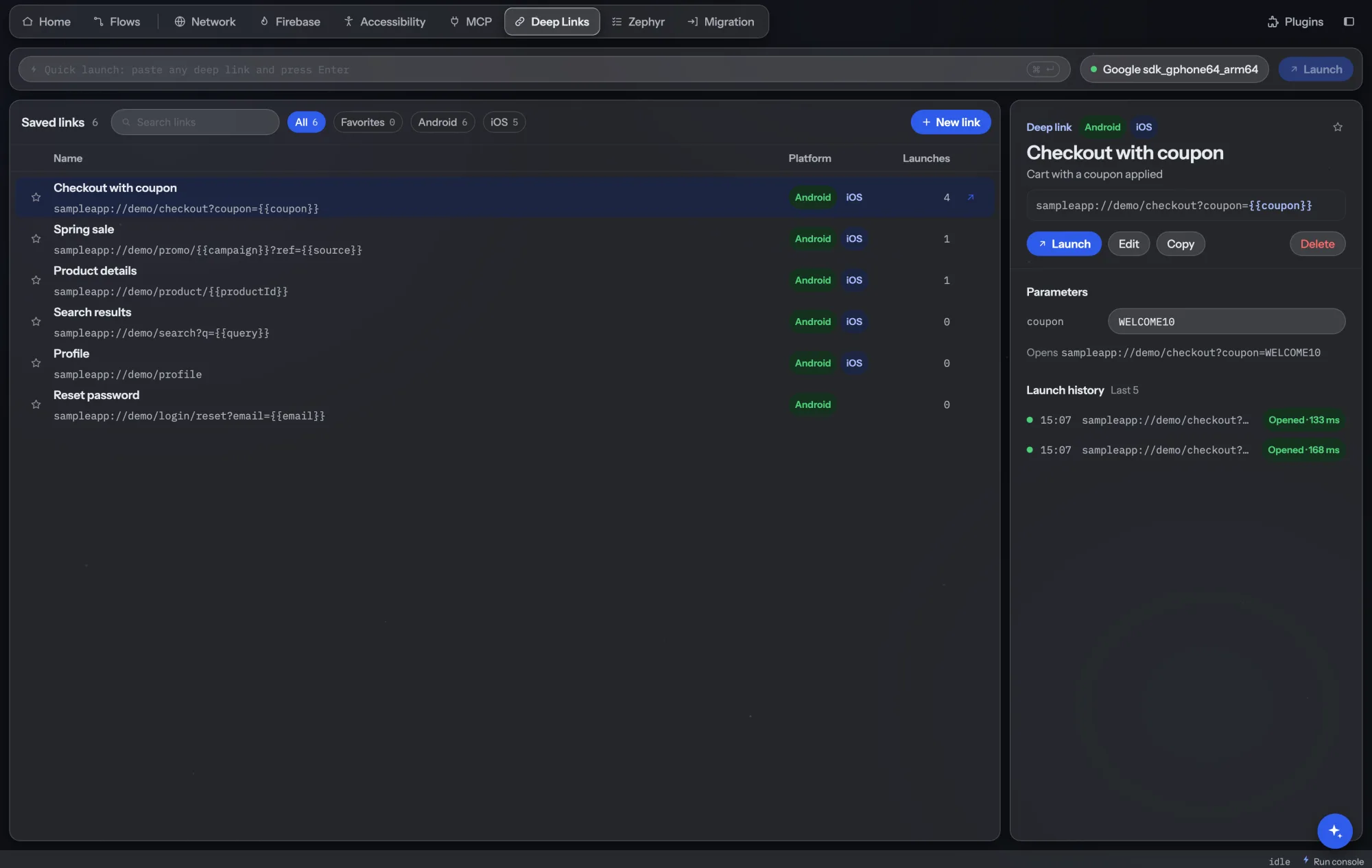
Everything in the Deep Links tab.
Link library
Save deep links, app links and universal links with a name, description, tags and the platforms they work on.
Variables
Write a link once as a template, like myapp://product/{{productId}}, and fill the values when you open it.
Quick launch
Paste any URL and open it on the device without saving it.
History
The last 100 launches with time and result, plus favorites at the top of the list. On Android it also shows which screen opened.
How teams use it.
Skip the navigation
Open the order details screen directly instead of tapping through login, menu and history every time.
More time testing the screen itself.
Check every link after a release
Open each saved link and confirm it lands on the right screen, on Android and iOS.
Broken campaign links found before users find them.
Try campaign parameters
Fill different values for a link's variables and check the app reads each one correctly.
Marketing links tested with real values.
Collect links from the code
Ask an agent with the AI Assistant plugin to find every link in the app's source and save each one with the screen it opens.
A complete link list without writing it by hand.
- Included in Team and Enterprise, and in every plan's 6-week trial. See pricing.
- Opens links on Android devices and emulators and on iOS simulators. Physical iPhones aren't supported yet.
- Links are saved per project.